Tayon AI - Contact API Documentation
RESTful API for managing CRM contacts, leads, tags, stages, quality, and ownership
Authentication
All API requests require authentication using a Bearer token. Include your API token in the Authorization header of each request.
Authorization Header
Authorization: Bearer YOUR_API_TOKEN
How to Get Your API Token
You can obtain your API token from your account settings. The token is associated with your account and should be kept secure.
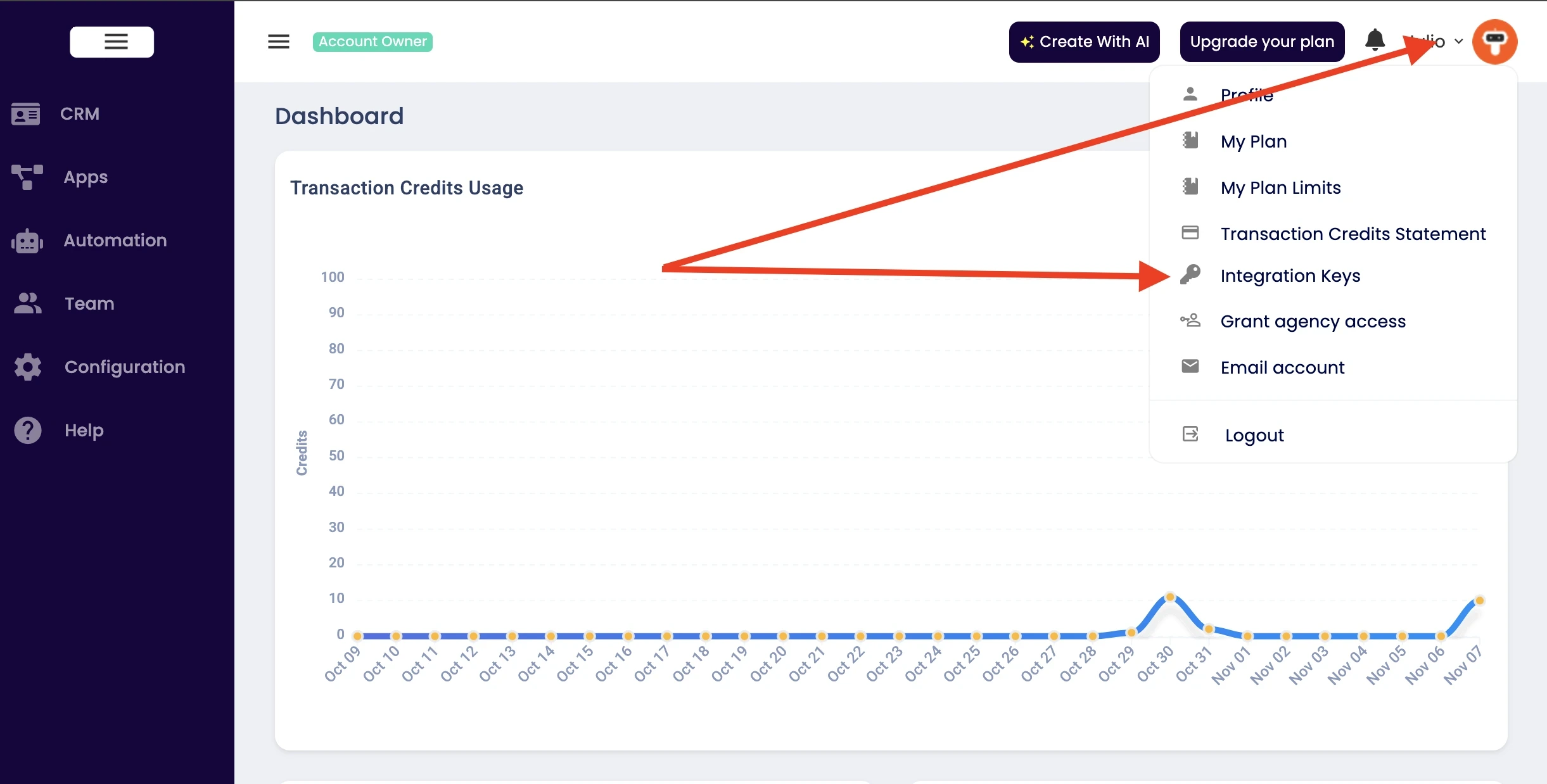
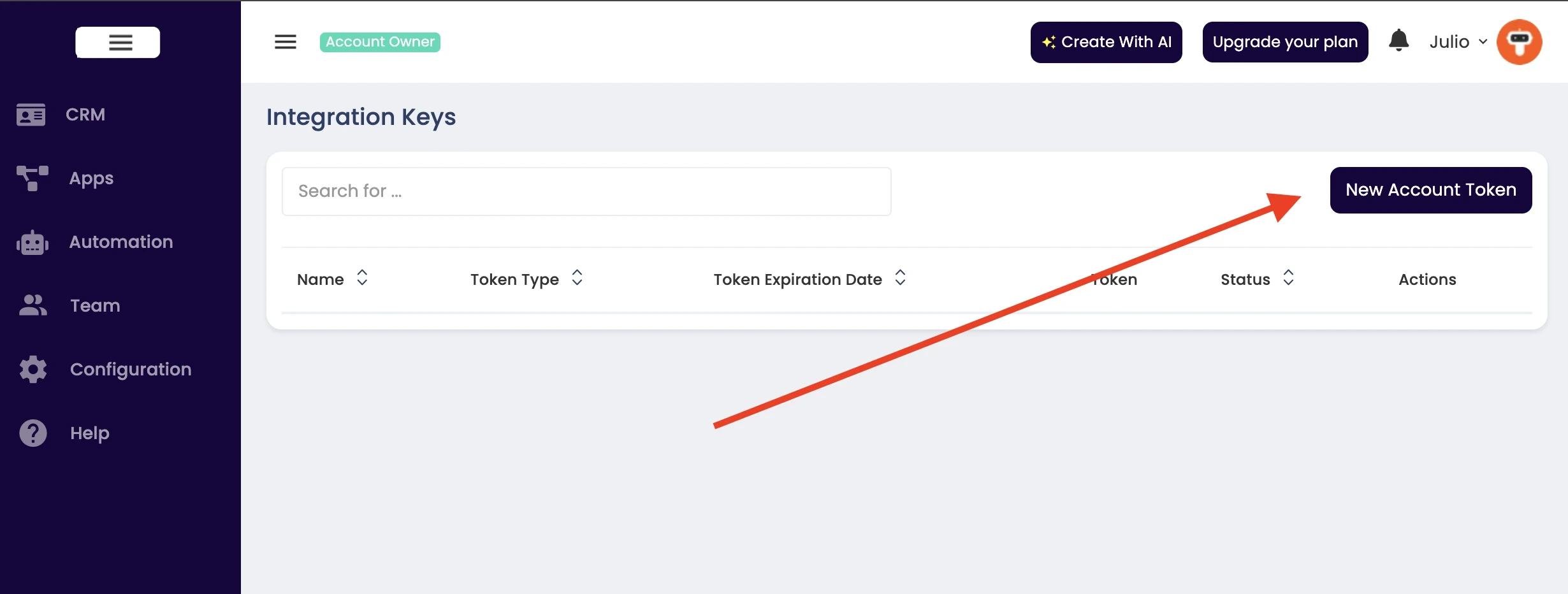
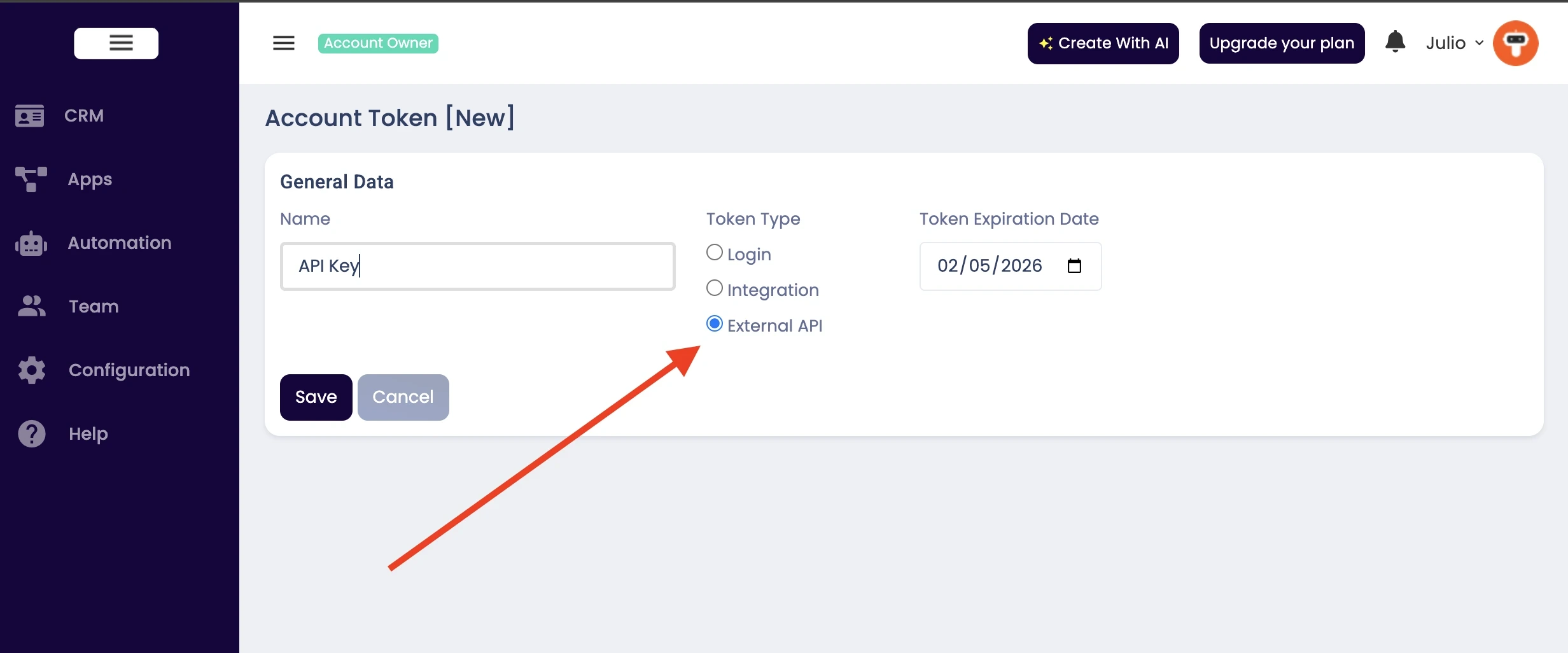
IMPORTANT: Only users with the Starter, Pro, or Business plans have access to the API. For Free and Express plans the API is not available.
Base URL
https://contact-api.tayon.ai
Create Contact
Creates a new contact or lead in the system.
Request Body
| Parameter | Type | Required | Description |
|---|---|---|---|
name |
string | Optional* | Full name of the contact (will be split into firstName and lastName) |
firstName |
string | Optional* | First name of the contact |
lastName |
string | Optional* | Last name of the contact |
email |
string | Optional** | Email address of the contact |
phone |
string | Optional** | Phone number of the contact |
businessName |
string | Optional | Business or company name |
birthday |
string | Optional | Birthday (format: YYYY-MM-DD) |
address |
string | Optional | Street address |
city |
string | Optional | City |
state |
string | Optional | State or province |
zipcode |
string | Optional | ZIP or postal code |
timeZone |
string | Optional | Time zone |
value |
string | Optional | Projected value or deal amount |
stageName |
string | Optional | Name of the stage (must exist in your account) |
qualityName |
string | Optional | Name of the quality (must exist in your account) |
ownerEmail |
string | Optional | Email of the team member who will own this contact |
snapshot |
string | Optional | Summary or snapshot information about the contact |
note |
string | Optional | Initial note to add to the contact |
tags |
array | Optional | Array of tag names (will be created if they don't exist) |
name OR (firstName/lastName) is required.** At least one of
email or phone must be provided.
Example Request
POST /api/contact
Authorization: Bearer YOUR_API_TOKEN
Content-Type: application/json

{
  "name": "John Doe",
  "email": "john@example.com",
  "phone": "+15551234567",
  "businessName": "Acme Corp",
  "city": "New York",
  "state": "NY",
  "value": "5000",
  "stageName": "New Lead",
  "qualityName": "High",
  "ownerEmail": "sales@yourcompany.com",
  "snapshot": "Interested in enterprise solution, contacted via website",
  "note": "Initial contact made through website form",
  "tags": ["Hot Lead", "Website", "Q1 2024"]
}
Example Response
{
  "success": true,
  "message": "Contact created successfully",
  "data": {
    "uid": "ABC12345",
    "email": "john@example.com",
    "phone": "+15551234567",
    "firstName": "John",
    "lastName": "Doe"
  }
}
Get Contact
Retrieves one or more contacts based on the identifier provided.
Query Parameters
| Parameter | Type | Required | Description |
|---|---|---|---|
uid |
string | Optional* | Unique identifier of the contact (returns single contact) |
email |
string | Optional* | Email address of the contact(s) (may return multiple contacts) |
phone |
string | Optional* | Phone number of the contact(s) (may return multiple contacts) |
uid, email, or phone is required.
Example Request
GET /api/contact?uid=ABC12345
Authorization: Bearer YOUR_API_TOKEN
Example Response (Single Contact)
{
  "success": true,
  "message": "Contact retrieved successfully",
  "data": {
    "uid": "ABC12345",
    "email": "john@example.com",
    "phone": "+15551234567",
    "firstName": "John",
    "lastName": "Doe",
    "businessName": "Acme Corp",
    "address": "123 Main St",
    "city": "New York",
    "state": "NY",
    "zipcode": "10001",
    "timeZone": "America/New_York",
    "value": "5000",
    "stageName": "New Lead",
    "qualityName": "High",
    "ownerEmail": "sales@yourcompany.com",
    "snapshot": "Interested in enterprise solution",
    "notes": "2025-08-12 09:35 Talked to lead and he said to call back in 2 days.\n\n2025-08-14 10:46 Called as requested and sent the prices.",
    "tags": ["Hot Lead", "Website"],
    "created": "2024-01-15T10:30:00Z",
    "lastUpdate": "2024-01-15T14:20:00Z"
  }
}
Example Response (Multiple Contacts)
{
  "success": true,
  "message": "2 contacts found",
  "data": [
    {
      "uid": "ABC12345",
      "email": "john@example.com",
      "phone": "+15551234567",
      "firstName": "John",
      "lastName": "Doe"
    },
    {
      "uid": "XYZ67890",
      "email": "john@example.com",
      "phone": "+15559876543",
      "firstName": "John",
      "lastName": "Smith"
    }
  ]
}
Update Contact
Updates an existing contact. Only the fields provided will be updated; omitted fields remain unchanged.
Request Body
| Parameter | Type | Required | Description |
|---|---|---|---|
uid |
string | Required | Unique identifier of the contact to update |
name |
string | Optional | Full name (will be split into firstName and lastName) |
firstName |
string | Optional | First name |
lastName |
string | Optional | Last name |
email |
string | Optional | Email address |
phone |
string | Optional | Phone number |
businessName |
string | Optional | Business or company name |
birthday |
string | Optional | Birthday (format: YYYY-MM-DD) |
address |
string | Optional | Street address |
city |
string | Optional | City |
state |
string | Optional | State or province |
zipcode |
string | Optional | ZIP or postal code |
timeZone |
string | Optional | Time zone |
value |
string | Optional | Projected value or deal amount |
stageName |
string | Optional | Name of the stage |
qualityName |
string | Optional | Name of the quality |
ownerEmail |
string | Optional | Email of the team member who will own this contact |
snapshot |
string | Optional | Summary or snapshot information about the contact |
tags |
array | Optional | Array of tag names to add (additive only) |
Example Request
PUT /api/contact
Authorization: Bearer YOUR_API_TOKEN
Content-Type: application/json

{
  "uid": "ABC12345",
  "city": "Los Angeles",
  "state": "CA",
  "value": "10000",
  "stageName": "Qualified",
  "snapshot": "Follow-up scheduled for next week. Very interested in premium package.",
  "tags": ["Premium Interest"]
}
Example Response
{
  "success": true,
  "message": "Contact updated successfully",
  "data": {
    "uid": "ABC12345",
    "email": "john@example.com",
    "phone": "+15551234567",
    "firstName": "John",
    "lastName": "Doe",
    "city": "Los Angeles",
    "state": "CA",
    "value": "10000",
    "stageName": "Qualified",
    "snapshot": "Follow-up scheduled for next week. Very interested in premium package.",
    "tags": ["Hot Lead", "Website", "Premium Interest"]
  }
}
Delete Contact
Permanently deletes a contact from the system.
Query Parameters
| Parameter | Type | Required | Description |
|---|---|---|---|
uid |
string | Required | Unique identifier of the contact to delete |
Example Request
DELETE /api/contact?uid=ABC12345
Authorization: Bearer YOUR_API_TOKEN
Example Response
{
  "success": true,
  "message": "Contact deleted successfully",
  "data": {
    "uid": "ABC12345"
  }
}
Add Tag to Contact
Adds a tag to a contact. If the tag doesn't exist, it will be created automatically.
Request Body
| Parameter | Type | Required | Description |
|---|---|---|---|
uid |
string | Optional* | Unique identifier of the contact |
email |
string | Optional* | Email address of the contact |
phone |
string | Optional* | Phone number of the contact |
tagName |
string | Required | Name of the tag to add |
uid, email, or phone is required.
Example Request
POST /api/contact/tag/add
Authorization: Bearer YOUR_API_TOKEN
Content-Type: application/json

{
  "uid": "ABC12345",
  "tagName": "VIP Customer"
}
Example Response
{
  "success": true,
  "message": "Tag added to contact successfully",
  "data": {
    "contactUid": "ABC12345",
    "contactEmail": "john@example.com",
    "contactPhone": "+15551234567",
    "tagName": "VIP Customer"
  }
}
Add Note to Contact
Adds a note to a contact's history. Notes are timestamped and stored chronologically.
Request Body
| Parameter | Type | Required | Description |
|---|---|---|---|
uid |
string | Optional* | Unique identifier of the contact |
email |
string | Optional* | Email address of the contact |
phone |
string | Optional* | Phone number of the contact |
note |
string | Required | Note content to add to the contact |
uid, email, or phone is required.
Example Request
POST /api/contact/note/add
Authorization: Bearer YOUR_API_TOKEN
Content-Type: application/json

{
  "uid": "ABC12345",
  "note": "Customer called to inquire about enterprise pricing. Scheduled demo for next Tuesday at 2 PM."
}
Example Response
{
  "success": true,
  "message": "Note added to contact successfully",
  "data": {
    "contactUid": "ABC12345",
    "contactEmail": "john@example.com",
    "contactPhone": "+15551234567",
    "note": "Customer called to inquire about enterprise pricing. Scheduled demo for next Tuesday at 2 PM."
  }
}
Change Contact Stage
Updates the stage of a contact in your sales pipeline.
Request Body
| Parameter | Type | Required | Description |
|---|---|---|---|
uid |
string | Optional* | Unique identifier of the contact |
email |
string | Optional* | Email address of the contact |
phone |
string | Optional* | Phone number of the contact |
stageName |
string | Required | Name of the stage (must exist in your account) |
uid, email, or phone is required.
Example Request
PUT /api/contact/stage
Authorization: Bearer YOUR_API_TOKEN
Content-Type: application/json

{
  "uid": "ABC12345",
  "stageName": "Qualified"
}
Example Response
{
  "success": true,
  "message": "Contact stage updated successfully",
  "data": {
    "contactUid": "ABC12345",
    "contactEmail": "john@example.com",
    "contactPhone": "+15551234567",
    "stageName": "Qualified"
  }
}
Change Contact Quality
Updates the quality level of a contact (e.g., High, Medium, Low).
Request Body
| Parameter | Type | Required | Description |
|---|---|---|---|
uid |
string | Optional* | Unique identifier of the contact |
email |
string | Optional* | Email address of the contact |
phone |
string | Optional* | Phone number of the contact |
qualityName |
string | Required | Name of the quality level (must exist in your account) |
uid, email, or phone is required.
Example Request
PUT /api/contact/quality
Authorization: Bearer YOUR_API_TOKEN
Content-Type: application/json

{
  "phone": "+15551234567",
  "qualityName": "High"
}
Example Response
{
  "success": true,
  "message": "Contact quality updated successfully",
  "data": {
    "contactUid": "ABC12345",
    "contactEmail": "john@example.com",
    "contactPhone": "+15551234567",
    "qualityName": "High"
  }
}
Change Contact Owner
Changes the owner (team member) assigned to a contact.
Request Body
| Parameter | Type | Required | Description |
|---|---|---|---|
uid |
string | Optional* | Unique identifier of the contact |
email |
string | Optional* | Email address of the contact |
phone |
string | Optional* | Phone number of the contact |
ownerEmail |
string | Required | Email of the team member who will own the contact |
uid, email, or phone is required.
Example Request
PUT /api/contact/owner
Authorization: Bearer YOUR_API_TOKEN
Content-Type: application/json

{
  "uid": "ABC12345",
  "ownerEmail": "sales@yourcompany.com"
}
Example Response
{
  "success": true,
  "message": "Contact owner updated successfully",
  "data": {
    "contactUid": "ABC12345",
    "contactEmail": "john@example.com",
    "contactPhone": "+15551234567",
    "ownerEmail": "sales@yourcompany.com",
    "ownerName": "Jane Smith"
  }
}
Validate Email
Checks whether an email address is deliverable before you save it as a lead. Uses the same validation engine as the platform's conversational sites, so both agree on any given address.
Request Body
| Parameter | Type | Required | Description |
|---|---|---|---|
email |
string | Required | The email address to check |
valid rather than a false bad. Treat anything other than an explicit "bad" as a pass.
Example Request
POST /api/validate-email
Authorization: Bearer YOUR_API_TOKEN
Content-Type: application/json

{
  "email": "person@example.com"
}
Example Response
{
  "success": true,
  "message": "Email validated",
  "data": {
    "result": "bad",
    "reason": "invalid mx server",
    "suggestion": "person@gmail.com"
  }
}
result is valid or bad. reason and suggestion appear only when the address fails; suggestion is a likely correction for a typo such as gmial.com.
Cost: 1 credit per validation.
Send Message
Sends one transactional message to one person by email, SMS or WhatsApp. The recipient does not need to exist as a contact in your CRM.
Request Body
| Parameter | Type | Required | Description |
|---|---|---|---|
channel |
string | Required | One of email, sms, whatsapp |
to |
string | Required | Email address, or phone number in E.164 format (e.g. +15551234567) |
text |
string | Required | Message body |
subject |
string | Optional | Email subject line. Ignored for SMS and WhatsApp |
name |
string | Optional | Recipient's name, used in the message envelope |
from |
string | Optional | Email only. One of your verified sender addresses. Defaults to your white label's notifications address |
idempotency_key |
string | Optional | Repeat calls with the same key return the original result and are not charged again |
Example Request
POST /api/message
Authorization: Bearer YOUR_API_TOKEN
Content-Type: application/json

{
  "channel": "whatsapp",
  "to": "+5511999999999",
  "text": "Your code is 4821. It expires in 10 minutes.",
  "idempotency_key": "login-code-8f21c"
}
Example Response
{
  "success": true,
  "message": "Message queued",
  "data": {
    "id": "37811",
    "channel": "whatsapp",
    "status": "queued"
  }
}
400 with {"error": "whatsapp_not_connected"}. Connect WhatsApp in your dashboard, then send normally.
429 with code SEND_LIMIT_REACHED.
Cost: email 1 credit · WhatsApp 1 credit · SMS 30 credits (US) or 120 credits (non-US). You are charged when the message is actually sent, never for one that fails.
Send Bulk Email
Sends the same email to a list of recipients — useful for following up with captured leads.
Request Body
| Parameter | Type | Required | Description |
|---|---|---|---|
to |
array | Required | Email addresses, maximum 500 per call |
subject |
string | Required | Email subject line |
text |
string | Required | Email body |
from |
string | Optional | One of your verified sender addresses |
idempotency_key |
string | Optional | Protects against sending the same batch twice |
Example Request
POST /api/message/bulk
Authorization: Bearer YOUR_API_TOKEN
Content-Type: application/json

{
  "subject": "Your quote is ready",
  "text": "Thanks for your interest! Reply to this email and we'll get started.",
  "to": ["alice@example.com", "bob@example.com"]
}
Example Response
{
  "success": true,
  "message": "Bulk email queued",
  "data": {
    "queued": 2,
    "rejected": 0
  }
}
rejected counts addresses that were malformed or fell outside your remaining send allowance. When the allowance runs out mid-list the response also carries limitReached and limitMessage — the accepted messages are still queued.
Cost: 1 credit per email actually sent.
Generate Image
Creates an image from a text description and returns a hosted URL you can download into your own site.
Request Body
| Parameter | Type | Required | Description |
|---|---|---|---|
prompt |
string | Required | Description of the image you want |
aspect_ratio |
string | Optional | 16:9, 1:1 or 9:16. Defaults to 1:1 |
format |
string | Optional | png or webp. Defaults to png |
idempotency_key |
string | Optional | Returns the original image instead of generating — and charging for — a second one |
Example Request
POST /api/image
Authorization: Bearer YOUR_API_TOKEN
Content-Type: application/json

{
  "prompt": "a flat-design illustration of a blue paper airplane on a light background",
  "aspect_ratio": "16:9",
  "format": "png"
}
Example Response
{
  "success": true,
  "message": "Image generated",
  "data": {
    "url": "https://w.tyo.ai/api/YOUR_ACCOUNT/img-1784649304029-f61f2df2.png",
    "aspect_ratio": "16:9",
    "format": "png"
  }
}
Cost: 75 credits per image.
AI Text
Runs a prompt through the platform's AI and returns the text plus the token usage — for summarising notes, drafting replies, or classifying a lead from inside your own app.
Request Body
| Parameter | Type | Required | Description |
|---|---|---|---|
prompt |
string | Required | What you want the AI to do |
system |
string | Optional | System instruction setting the AI's role or tone |
max_tokens |
integer | Optional | Maximum length of the reply. Defaults to 500 |
Example Request
POST /api/ai
Authorization: Bearer YOUR_API_TOKEN
Content-Type: application/json

{
  "prompt": "Summarize: customer called twice about a delayed order, wants a refund.",
  "system": "You are a concise CRM assistant. Reply in one sentence.",
  "max_tokens": 60
}
Example Response
{
  "success": true,
  "message": "AI response generated",
  "data": {
    "text": "Customer requested a refund after two calls regarding a delayed order.",
    "tokens": {
      "input": 43,
      "output": 12,
      "total": 55
    }
  }
}
Cost: 1 credit per 1,000 tokens.
Credit Costs
Contact endpoints are free. The platform endpoints consume transaction credits:
| Endpoint | Cost | Charged |
|---|---|---|
/api/validate-email |
1 credit | Per validation |
/api/message (email) |
1 credit | When sent |
/api/message (WhatsApp) |
1 credit | When sent |
/api/message (SMS) |
30 credits US / 120 non-US | When sent |
/api/message/bulk |
1 credit per email | When sent |
/api/image |
75 credits | Per image |
/api/ai |
1 credit per 1,000 tokens | Per call |
402 Payment Required with {"error": "insufficient_credits"} and nothing is performed.
Response Format
All API responses follow a consistent JSON format.
Success Response
{
  "success": true,
  "message": "Operation completed successfully",
  "data": {
    // Response data object
  }
}
Error Response
{
  "success": false,
  "error": "Error message describing what went wrong",
  "code": "ERROR_CODE"
}
HTTP Status Codes
| Status Code | Meaning | Description |
|---|---|---|
| 200 | OK | Request succeeded |
| 201 | Created | Resource was successfully created |
| 400 | Bad Request | Invalid request parameters or missing required fields |
| 401 | Unauthorized | Invalid or missing authentication token |
| 402 | Payment Required | Not enough transaction credits to perform the request |
| 403 | Forbidden | Valid token but insufficient permissions |
| 404 | Not Found | Requested resource does not exist |
| 405 | Method Not Allowed | HTTP method not supported for this endpoint |
| 429 | Too Many Requests | Rate limit or sending limit exceeded |
| 500 | Internal Server Error | Server error occurred while processing the request |
Error Codes
| Code | Description |
|---|---|
AUTH_ERROR |
Authentication failed |
BAD_REQUEST |
Invalid request parameters |
UNAUTHORIZED |
Invalid or missing token |
FORBIDDEN |
Access denied |
NOT_FOUND |
Resource not found |
METHOD_NOT_ALLOWED |
HTTP method not supported |
INSUFFICIENT_CREDITS |
Not enough transaction credits |
RATE_LIMITED |
Too many API requests in the last minute |
SEND_LIMIT_REACHED |
Hourly or daily email sending limit reached |
WHATSAPP_NOT_CONNECTED |
No active WhatsApp connection on the account |
REQUEST_IN_PROGRESS |
An earlier call with the same idempotency_key is still running |
SERVER_ERROR |
Internal server error |
Rate Limiting
To ensure fair usage and system stability, API requests are rate-limited to 120 requests per minute per account. If you exceed it you will receive a 429 Too Many Requests response with the code RATE_LIMITED.
Email sending carries a separate allowance of 100 per hour and 500 per day per account, shared between the API and campaigns sent from your dashboard. Exceeding it returns 429 with the code SEND_LIMIT_REACHED.
Support
If you have questions or need assistance with the API, please contact our support team.